Chachi POS runs your counter, your stock, your customers' utang and the day's cash on the
PC, tablet or phone you already have. Made in Koronadal for drugstores, agrivet supply stores and
cafés, with motorcycle shops and wholesale & retail next.
Internet down? Still selling.Every sale is saved on your device.
One system, made for your kind of store
Built around how your store actually sells
One app for every kind of store. Choose yours when you set it up, and Chachi POS starts with what your shelf needs.
Available
Pharmacy
Over-the-counter drugstores and botika
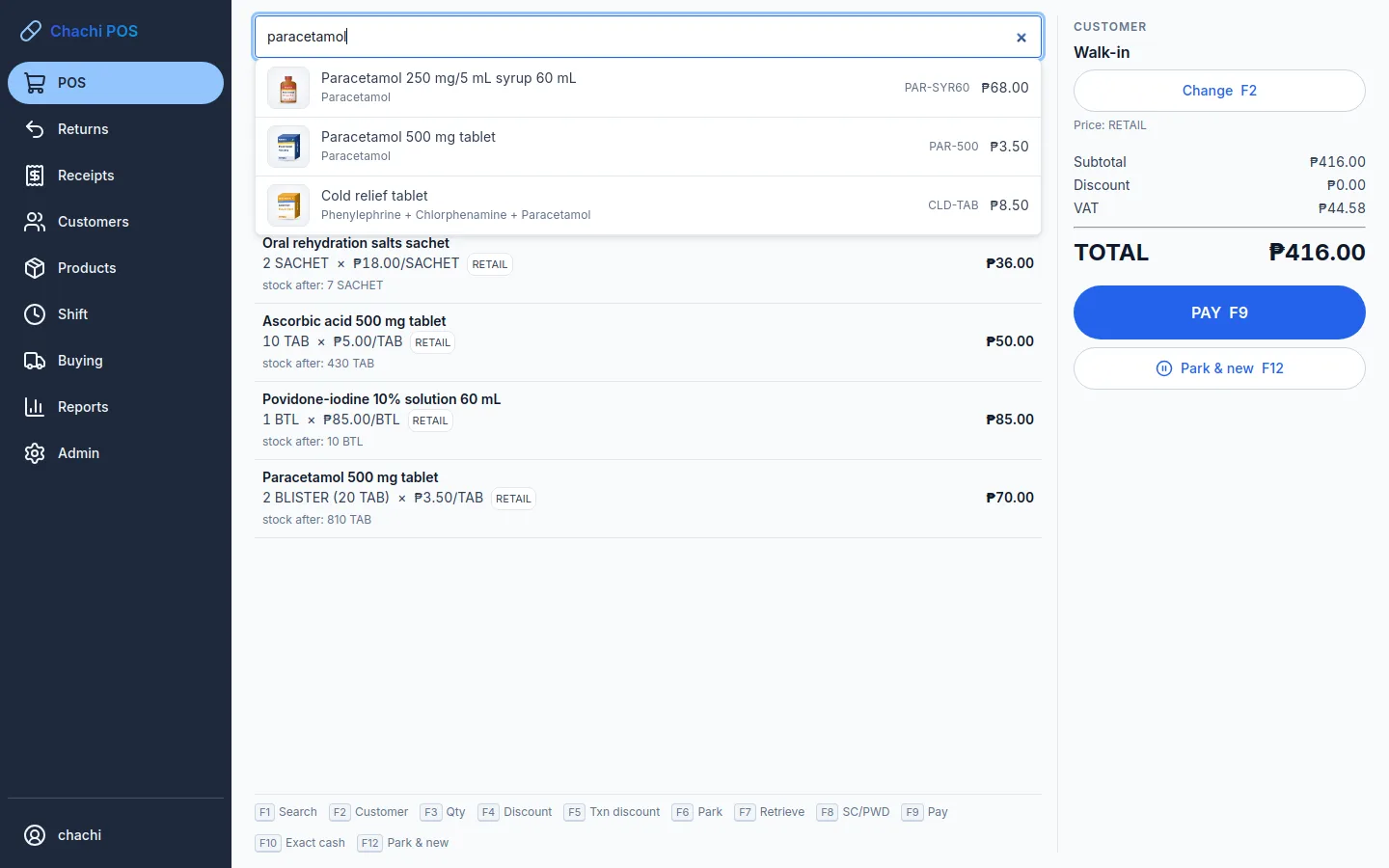
Search by generic name: "paracetamol" finds every brand
A picture of every box, so the cashier picks the right one
Batches and expiry, first-expiring sold first
Senior citizen and PWD 20% discount built in
Windows PC · Android tablet or phone
Available
Agrivet
Feed, seed, fertilizer and veterinary supply
Sell by the sack or by the kilo: 1 sack = 50 kg
Retail, wholesale and dealer prices
Farm customers on credit, with limits and statements
Feed and vet returns, each with its reason
Windows PC · Android tablet or phone
Available
Café / Restaurant
Cafés, restaurants, eateries and food stalls
Take the order at the table, and be paid when the customer leaves
A kitchen ticket for every order, and only what changed after that
Notes like "less ice", dine-in, take-out and delivery
Meals made to order sell with no stock to count; a service charge if you use one
Windows PC · Android tablet or phone · web
Coming soon
Motorcycle shop
Parts, accessories and service shops
Parts and accessories on the same counter, stock and utang
Several barcodes per item, for parts that come in different boxes
Being built now. Talk to us to try it early
Coming to Windows and Android
Available
Sari-sari & wholesale
Sari-sari stores, groceries, general merchandise and distributors
Sell by the sachet, the strip or the case, each at its own price
Switch a walk-in sale to wholesale prices with one tap
Quick keys for goods with no barcode, and "₱20 worth of rice"
The utang notebook: add a customer at the counter, with a limit
Windows PC · Android tablet or phone · web
What it does
Everything from the first sale to the last peso in the drawer
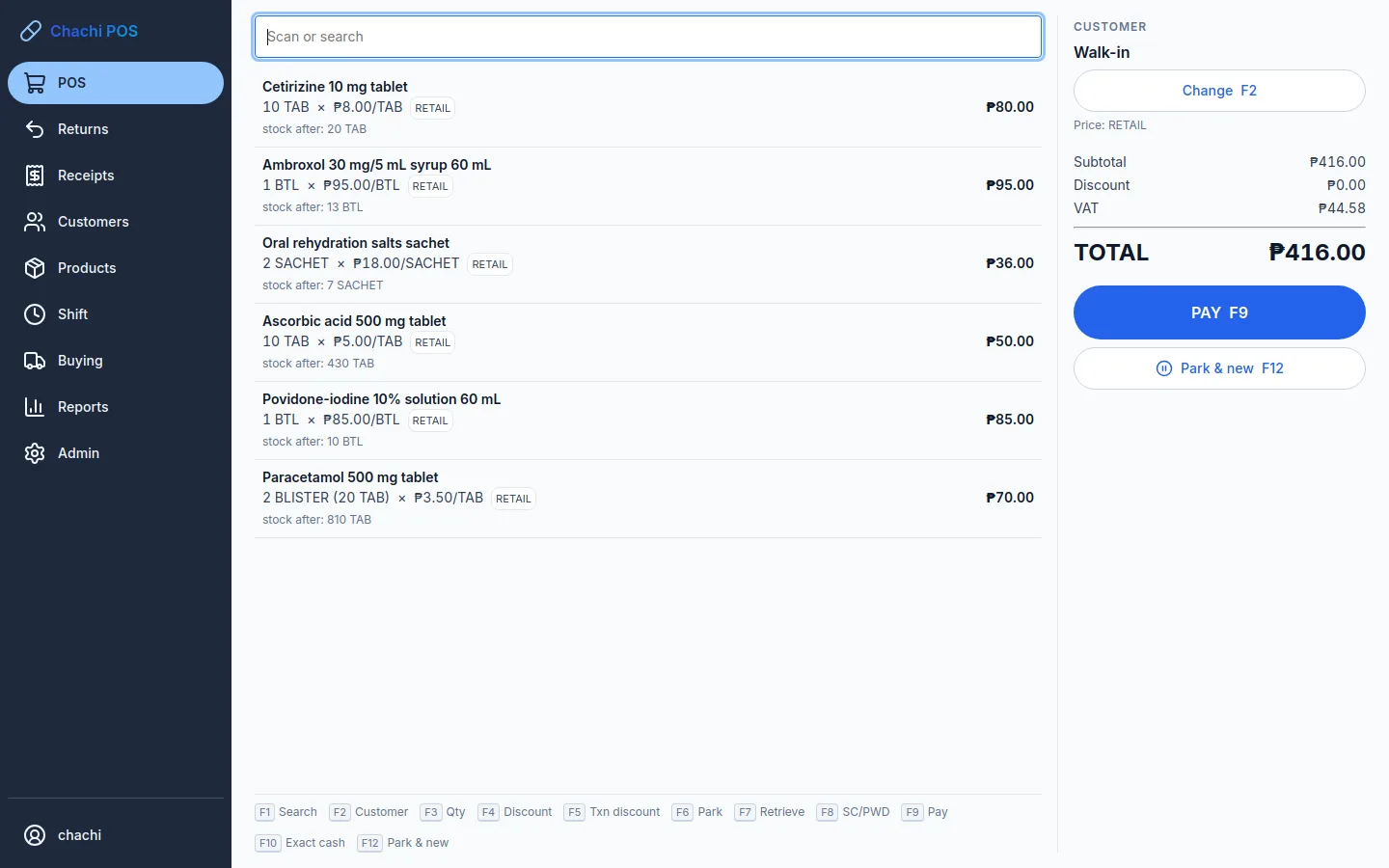
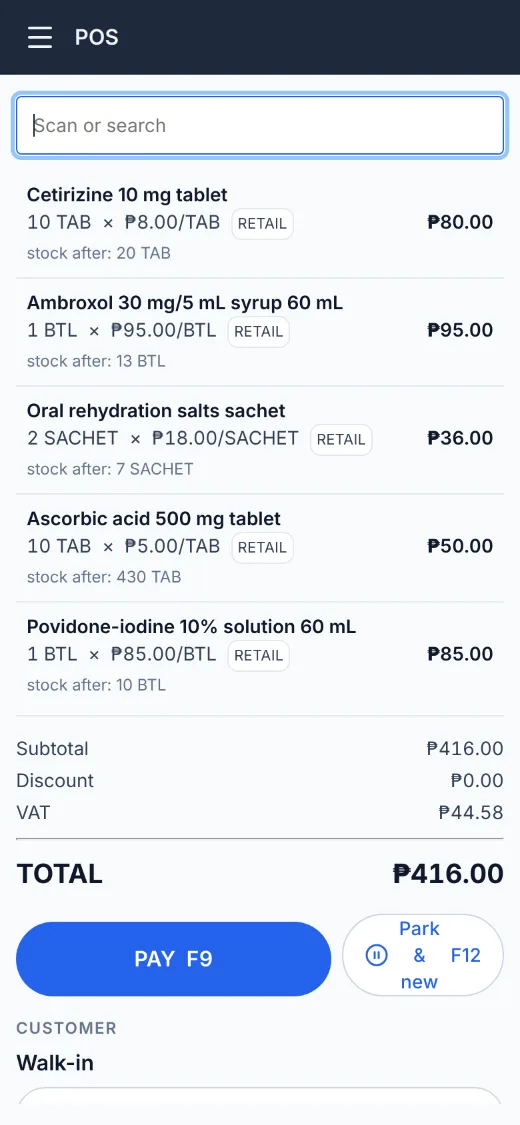
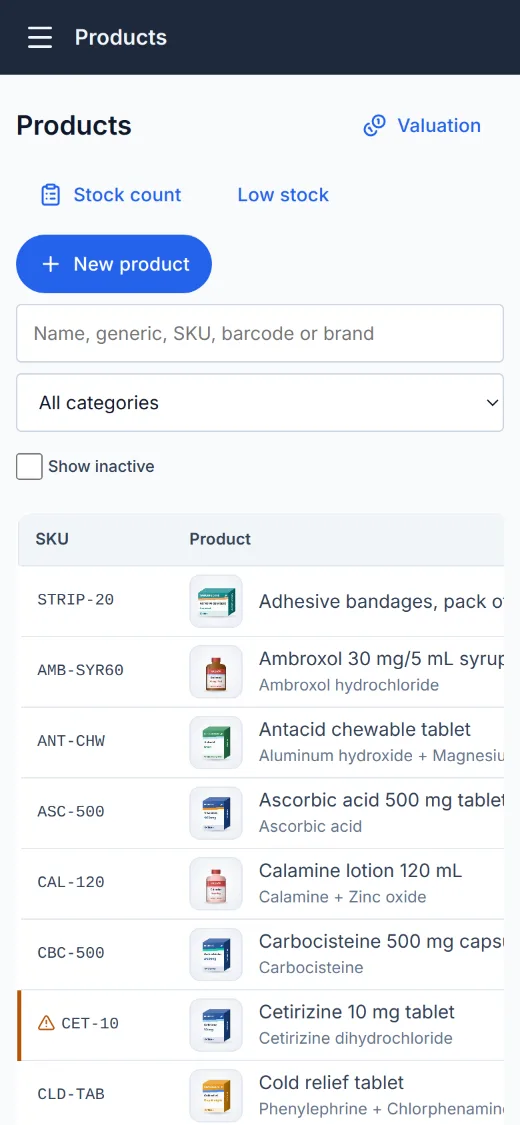
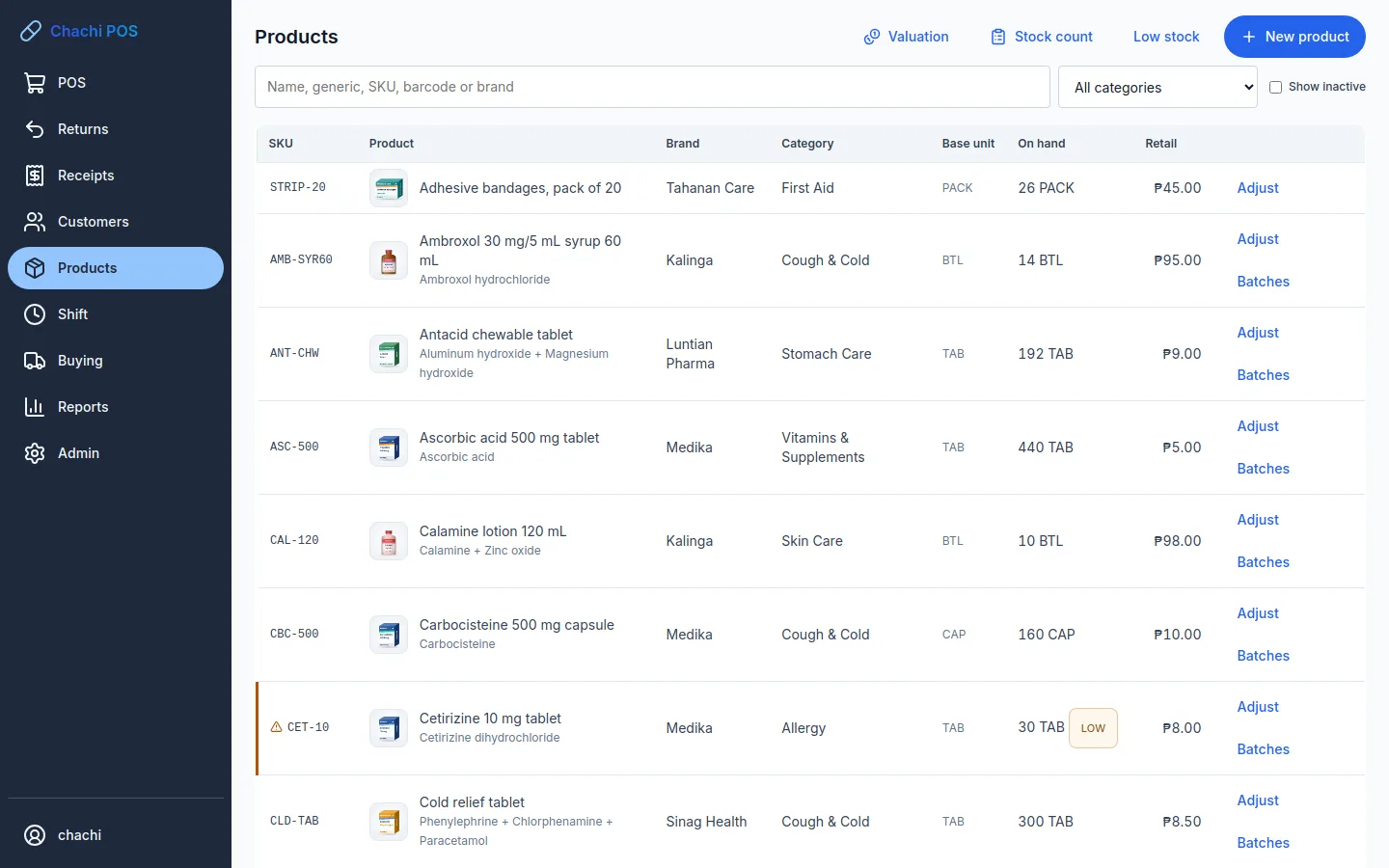
These are the real screens, from a demo pharmacy's products.
A counter that keeps up with the line
Scan the barcode or type a few letters. A busy moment can be parked while you serve the next
customer, and the cart is still there after a power cut.
Cash, GCash, QR Ph, utang and store creditSplit one sale across several, with the change worked out for you.
Receipts on a 58 mm or 80 mm thermal printerOver USB or the network, and the cash drawer opens on cash sales.
No sale is ever edited or deletedReturns and voids are separate records, with who approved them.
Counter
Know what's on the shelf, and what's about to expire
Everything that comes in, goes out, is counted or is written off is recorded. The stock figure
always has a reason behind it.
Batches and expiryFirst-expiring stock sells first, expired stock is blocked, and a batch can be recalled in one step.
Low-stock alerts and stock countsCount the shelf, see the difference, post the adjustment.
Purchase orders and deliveriesReceive against the order; the average cost updates as stock arrives.
Catalogue
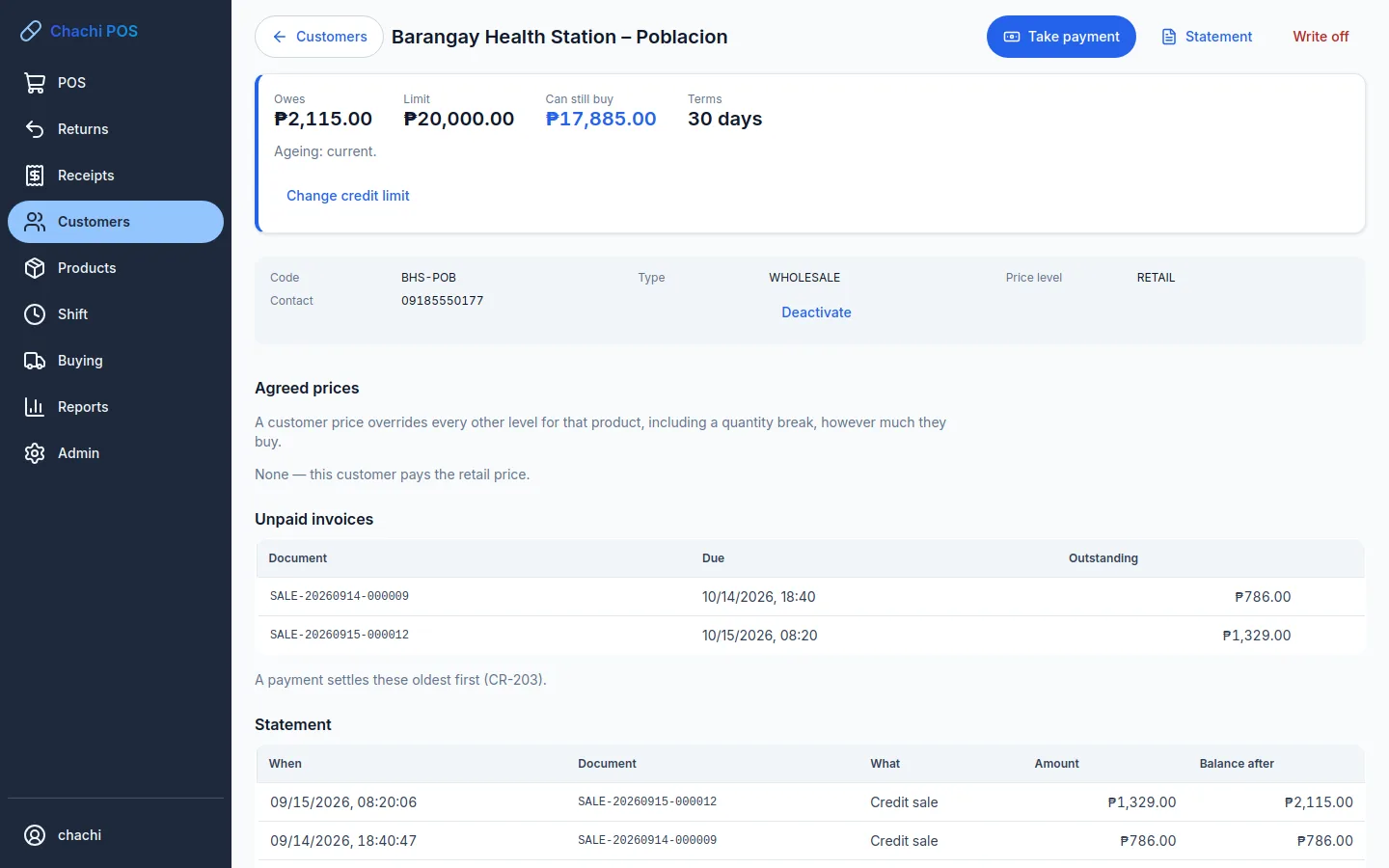
Utang, cash and the day's numbers, settled
Credit customers get limits and terms, and every peso in the drawer is accounted for at closing.
Credit limits, statements and ageingPayments settle the oldest debt first. Print a statement for any customer.
A shift close that countsExpected against counted, for each way of paying, with a reason for any difference.
Reports you will actually readDaily sales, gross profit, top and slow sellers and GCash reconciliation, with CSV export.
Customer account
Peace of mind
What a store owner worries about, handled
Works without internet
Selling, stock and reports all run on your own device. A power cut never loses a sale that was saved.
Your records stay yours
Sales, stock and customers are never uploaded to us. A backup is made at every closing and every day, and the last 30 are kept.
The right access for each person
Owner, manager, cashier and inventory roles, cashier PINs, and a manager's approval for overrides.
A record that can't be erased
Who changed a price, who approved a discount, who voided a sale: all of it is kept for good.
VAT or non-VAT
Unregistered, non-VAT or VAT-registered (12% inclusive, with exempt and zero-rated items), and discounts that stay within limits.
Start from a spreadsheet
Your products, prices and opening stock load from a spreadsheet. Any USB barcode scanner works from day one.
Devices
On the computer or tablet you already have
No server to buy and nothing to set up in the back room.
Available
Windows PC
Installs from one file on Windows 10 or 11 and runs well on an ordinary 4 GB computer.
Every kind of store
Available
Android tablet or phone
The whole store on one tablet, with no PC needed. Take each product's photo with the camera.
Android 8 or newer · network receipt printers
Available
Web browser
Your store on the web, hosted by us, with nothing to install: open it from any browser. The web needs the internet; phones and PCs connected to it keep selling offline.
Tell us about your store. We install Chachi POS on your PC or Android device and help you load your products.
Link it to your store
On the POS, choose Link this POS. Open pos.chachisoftware.store/link,
sign in with your Google account and approve it. Your 14-day free trial starts then.
Pay monthly, sell every day
The POS renews itself quietly whenever it's online, and keeps selling for 30 days without a connection.
CHACHI POS
Store subscription
Free trial14 days
Counter & payments✓
Stock & expiry✓
Utang & statements✓
Reports & backups✓
Users & audit trail✓
Works offline30 days
MONTHLYAsk us
Pay by GCash or bank transfer Salamat po!
THIS IS NOT AN OFFICIAL RECEIPT
Questions
What store owners ask us
How to do something in the POS? It's in the user guide.
Is there a separate app for my kind of store?
No. There is one app, Chachi POS. When you set it up, you choose what kind of store it
is (a pharmacy, an agrivet supply store or a café / restaurant, with motorcycle shops and wholesale & retail coming), and it
starts with the settings that kind of store needs. The sign-in screen shows it, for example
Chachi POS (Pharmacy).
Do I need the internet to use it?
Not to sell. Everything runs on your own PC or tablet. When it's online, the POS
checks your subscription in the background, and it keeps working for 30 days without a connection,
plus 7 days' grace with a warning.
Can you see my sales?
No. Your sales, stock and customer records never leave your device. The subscription
check sends only your store's name, the app version and a device ID.
See our privacy notice.
What happens if I stop paying?
Your records stay yours, on your device. When a subscription runs out, a new shift
can't be opened, but reports, export, backups and restore keep working.
Does it print official receipts?
No. Chachi POS prints sales receipts marked "This is not an official receipt".
It isn't BIR-accredited, so keep issuing your official receipts or invoices as you do today.
Can a pharmacy use it for prescription medicines?
Chachi POS for pharmacies is made for over-the-counter drugstores. It doesn't keep a
prescription book or a dangerous-drugs register, so it isn't meant for dispensing prescription drugs.
Which printers and scanners work?
Thermal receipt printers that use ESC/POS, 58 mm or 80 mm, over USB or the network, and
USB barcode scanners. A cash drawer connects through the printer. On Android, use a network (Wi-Fi or LAN)
printer. Bluetooth printers aren't supported yet.
Is the Android app on Google Play?
Not yet. We install it on your tablet or phone for you.
I already have Chachi POS. Where do I link it?
On the POS, open Admin → Subscription → Link this POS to get a code,
then enter it at pos.chachisoftware.store/link. Only the owner signs in with Google.
Everyone at the counter keeps their own POS login.
Bring Chachi POS to your store
Tell us what you sell and how many counters you have. We'll get you set up and start your 14-day trial.